

Cart
- Cart Empty!
- Appliances
- Electronic Components
- Software Esd
- Audio/ Video/ Multimedia
- Cables & Accessories
- Communication & Networking
- Controller & Interface
- Imaging & Photography
- Input Devices
- Monitor & Display
- Motherboard/ Memory/ Processor
- Notebook/ Tablet Pc/ E-book
- Pc & Workstation
- Power Components & Protection
- Printer/ Aio/ Copier/ Fax
- Projectors
- Servers
- Software
- Storage
- Telephony/ Handhelds
Every effort has been made to ensure the accuracy of all information contained herein. e-nitiative shall not be liable for any changes resulting in wrong product description, tax code and/or price. The shown information (specifications, prices, taxes) should be considered as an indication and can be changed at any moment and without any prior notice.
RS-DATA bvba
Onze lieve vrouw ten steenstraat 1
B-3300 Tienen
Belgium
Telephone : 016/820712
VAT : BE 466.551.192



Product Details
Introduction
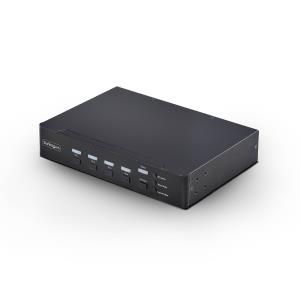
Control up to four DisplayPort computers with mouse roaming, quad view, and picture-in-picture support
Streamline complex workflows by managing up to four DisplayPort computers from a single keyboard, mouse, and display. With support for true 4K 60 Hz (4:4:4) resolution, this multiview KVM delivers crisp text and precise visuals across Windows, macOS, and Linux workstations.
Multiview Monitoring
Maintain full awareness and react faster by viewing multiple systems at once. Flexible display modes including Quad-View, Picture-in-Picture (PiP), and Picture-by-Picture (PbP) let you monitor and compare the four sources.
Instant Switching With Continuous Video
Move seamlessly between systems using mouse roaming with zero latency and no screen blackout. Continuous video output keeps every system visible at all times, eliminating delays caused by switching or waiting for auto-scan cycles, reducing disruption in control rooms, industrial environments, and other time-sensitive operations.
Switch Your Way
Adapt the KVM to your environment with multiple switching methods. Use front-panel buttons, keyboard hotkeys, mouse roaming, mouse side buttons, or serial control via RJ-11 or USB-C to support hands-on use, remote management, or automated workflows.
Built-In Dual Display Output
Mirror the KVM output to two displays simultaneously using DisplayPort and HDMI. Use a local desktop monitor for hands-on control while displaying the same view on a larger wall-mounted TV for monitoring or team visibility. This dual console output improves visibility, collaboration, and redundancy without requiring external splitters or additional hardware.


